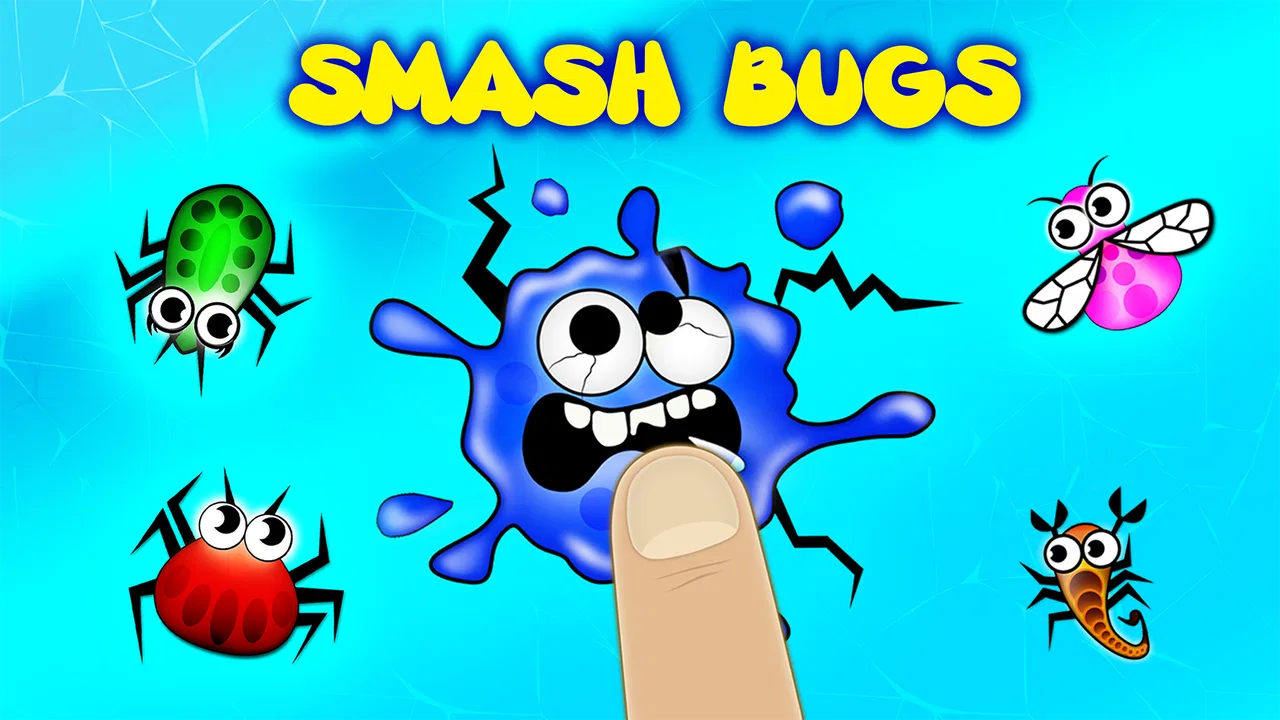
Bug Smashing toddler games
- 4.4
- Rating
- 5.00M
- Installs
- Free
- Price

 Analysis by App-foxy
When I opened Bug Smashing toddler games, I was looking for something very specific: a simple activity that a young child could understand without a long explanation. This is an educational game from Kidemy, aimed at children from one to four years old, and its central idea is exactly what the name suggests—smashing bugs. That narrow focus is also its biggest strength. It does not try to become a full preschool curriculum or a complicated adventure. It gives a small child an immediately understandable action and lets that action carry the experience.
I would describe it as a quick, hands-on distraction rather than a complete learning program. The game is free to start, carries an Everyone age rating, and has been available since October 21, 2014. Its current version is 4.1.51, with Android support beginning at version 7.1. That combination makes it accessible to many families using an older spare phone or tablet, although the age range still matters more than the technical requirements when deciding whether it is appropriate for a particular child.
How I would decide whether it belongs on a child’s device
The first question is not whether a toddler will understand the rules. Most children in the intended age group can grasp the basic gesture very quickly. The more useful question is whether you want a short activity built around tapping, or a broader app that teaches several concepts through stories, puzzles, sounds, and guided lessons. Bug Smashing sits firmly in the first group.
You May Also Like

 Blood Strike: 2.5 Anniversary
Blood Strike’s Loadouts Turn Every Drop Into a Tactical Gamble
A close look at Blood Strike’s custom loadouts: how fast access to signature weapons reshapes its battle royale rhythm, rewards preparation, and narrows the gap between fights.

 Pandora - Music & Podcasts
Pandora’s Music Is Easy to Start, but Harder to Recover
Pandora’s strength is its low-effort path from a seed to a station. Its weak spot is how much confidence it asks you to place in connection, setup, and quiet recovery.

 8 Ball Pool
 Is Built on Rivalries, Rematches, and Routine
A close look at the rivalries, rematches, shared routines, and unanswered safety questions that turn a quick pool match into a persistent mobile community.

 Samsung Music
’s Quiet Strength Is Playing What You Already Own
Its reach comes less from spectacle than from dependable access to a personal library. That simplicity is both the app’s strongest retention engine and its ceiling.

 AccuWeather: Weather Radar
AccuWeather Review: A Quick, Clear Forecast for Everyday Decisions
For everyday plans, the best forecast is the one you can understand quickly. AccuWeather makes rain timing, radar, and local conditions easy to act on, with a few trade-offs.

 Hill Climb Racing
Why Hill Climb Racing Still Turns Crashes Into One More Run
A tiny car, a bumpy hill and one more upgrade: Hill Climb Racing keeps resurfacing because its simple chaos makes every near-miss feel personal.
More From Our News Desk



For a very young child, that simplicity can be valuable. A toddler who is still learning to control a finger on a screen may become frustrated by menus, instructions, or puzzles with several steps. Here, the central interaction is direct enough to invite experimentation. I found that this kind of design works best when an adult introduces it briefly, then watches how the child responds instead of assuming the game should hold attention for a long session.
The game has a strong fit for short waiting periods: sitting in a reception area, taking a quiet break while dinner is prepared, or giving a child a contained activity during a journey. I would not use it as a replacement for drawing, blocks, outdoor play, or conversation. Its value is more modest and more practical. It can occupy a small window of time with an action that feels playful and easy to repeat.
There is also a useful developmental consideration. Tapping a moving or visible target can encourage basic visual attention and hand coordination, but I would avoid presenting that as a formal lesson. The game may support practice in noticing and reacting, yet a child will not automatically learn broader ideas about insects, nature, counting, or science simply by playing it. Parents who want those outcomes will get more from playing alongside the child and adding their own questions.
What the first session feels like
My advice is to begin with the child sitting close enough for you to see how the screen is being used. Young children often tap with a whole hand, press repeatedly, or move the device while trying to follow the action. That is normal, but it means the experience depends partly on the device and the child’s motor control. A larger screen can make the interaction more comfortable, while a small phone may be harder for a child who is still developing accurate finger placement.
I would also start with the sound at a comfortable level rather than handing over the device at full volume. Toddler games can become surprisingly intense in a quiet room, and a child may focus more on repeated effects than on the activity itself. A short first session lets you judge whether the game is calming, exciting, or simply too repetitive for your child.
One practical tip is to treat the game as a shared prompt. After a few turns, pause and ask the child what they saw, where the bug was, or what they would like to do next. That turns a repetitive screen action into a small conversation. It is a better use of the app than leaving it running while the child plays without any interaction from an adult.
Where the focused design works best
The most convincing part of Bug Smashing is its low barrier to entry. A preschool game can lose its audience if it begins with several buttons, a character-selection screen, or a lesson that requires reading. This one is easier to approach because the premise is concrete. A child does not need to understand a story or remember a sequence of rules before trying the main activity.
That makes it particularly suitable for children who are just beginning to use touchscreens. It can also suit a child who does not enjoy alphabet or number apps yet. Many educational games assume that a child wants to identify letters, complete a puzzle, or follow a narrated story. Bug Smashing offers a different route: a tactile action first, with learning value coming from attention and coordination rather than from explicit academic content.
I also see an advantage for parents who want an app that can be explained in one sentence. If a child asks to use the tablet while you are nearby, you can set a simple boundary: one short activity, then the tablet goes away. Because the game is not built around a large world that invites constant exploration, it may be easier to keep the session contained than with a more expansive children’s title.
Its popularity gives some reassurance that the concept has broad appeal. The game has an average rating of 4.4 from around fourteen thousand ratings and has passed five million installs. I treat those figures as signs of reach, not proof that every toddler will enjoy it. Children differ sharply in their tolerance for repetition, their comfort with touch controls, and their interest in this particular theme.
Important limits for parents to notice
The same narrow focus that makes the game approachable can make it wear thin. If your child wants songs, pretend play, drawing tools, or a sequence of varied challenges, this may feel too small after the novelty fades. I would not choose it as the only educational app on a family device. It works better as one simple option among offline activities and, if needed, a broader preschool app.
There is another limitation in the word “educational.” The label is reasonable in a broad sense, but the game should not be confused with structured instruction. It does not replace an app designed specifically for early literacy, early numeracy, language development, or guided problem-solving. If your goal is to practise letter sounds, recognize quantities, or follow a progressive lesson path, a dedicated learning app will be a better match.
The bug-smashing theme will also be a personal choice. Some children find insects funny and exciting; others dislike them or become uncomfortable with the idea of hitting them. I would watch the child’s reaction instead of assuming the title will be universally appealing. If the theme causes distress, there is little reason to push through when gentler puzzle, coloring, or animal-based alternatives are available.
Parents should pay attention to purchases as well. The game is free, but optional in-app purchases range from $1.99 to $29.99 per item. I would check the device’s purchase controls before allowing independent play, especially when the child is too young to understand what a button connected to payment means. This is not a reason to reject the game automatically, but it is a reason to establish the household rules before the first session rather than afterward.
Choosing it against the usual alternatives
I’ll use this section to weigh the practical trade-off: a single, easy-to-grasp action can be more useful than a broad collection when a toddler has little patience for menus, while a broader app is a better fit when you want variety or a clearer learning path. The key is choosing around your child’s attention and the moment you need to fill, rather than expecting one game to serve every purpose.
When a broader preschool suite is the better choice
A general preschool suite is usually the stronger option for a parent who wants one app to cover several areas. Those products often combine early letters, numbers, matching, memory, songs, and simple puzzles. I would choose that category when the child is ready for variety or when an adult wants clearer progression between activities.
Bug Smashing wins when variety would create friction. A child who becomes lost in a large menu may do better with one recognizable interaction. It is also useful when you need a quick, low-explanation activity rather than a planned learning session. The trade-off is that you give up breadth. You are choosing immediate accessibility over a wider set of educational goals.
When creative apps fit better
Drawing and coloring apps are a better alternative for children who like to make things rather than react to targets. Creative activities can encourage longer periods of self-directed play and give parents more opportunities to talk about colors, shapes, and the child’s own ideas. They may also feel less repetitive for a child who dislikes tapping the same kind of object again and again.
I would still keep Bug Smashing in mind for a child who needs a clear response from the screen. Some toddlers enjoy seeing that their touch has an immediate result, while an open drawing canvas can feel confusing. The right choice depends on whether your child prefers a defined task or an open-ended one.
When puzzle and matching games are preferable
Matching and puzzle games make more sense when the child can follow a relationship between objects, remember a simple rule, or tolerate a little trial and error. They can offer more deliberate practice in recognition and problem-solving. Bug Smashing is the easier starting point for a child who is not ready for those extra steps, but it may be less satisfying once the child begins looking for challenges.
There is no need to switch immediately just because the child masters the basic interaction. I would switch when the game stops inviting attention and becomes automatic tapping. That is a more useful signal than age alone. A child within the intended range may still enjoy it, while another may outgrow it quickly.
What changes when moving between categories
The cost of switching is not mainly financial; it is the change in the child’s expectations. With Bug Smashing, the child can usually approach the activity through one familiar action. A broader app may require learning icons, navigating between sections, or remembering instructions. I would introduce a more complex alternative when I have time to sit with the child, not during a rushed moment when frustration is likely.
Moving in the other direction can be helpful too. If a large educational app overwhelms your child, returning to a focused activity may restore confidence. One of my preferred workflows would be to use Bug Smashing for a brief warm-up, then offer a puzzle or language activity only if the child is still interested. That keeps the simple game from carrying the entire educational burden while using its accessibility to start a calm session.
Another practical tip is to avoid judging the app by a single distracted session. Toddlers may be tired, hungry, or more interested in the device itself than the game. Try it at a quiet time, observe whether the child looks at the target before tapping, and notice whether they can stop without a major argument. Those observations tell you more about fit than a rating alone.
Who should install it, and who should skip it
I would recommend giving it a try if you want a free, straightforward game for a child between one and four, especially if the child enjoys quick touch interactions and you are comfortable supervising screen use. It is also a sensible download for a family that needs a small activity for occasional use rather than a full learning platform.
I would skip it if your main goal is a structured curriculum, deep educational progression, creative expression, or detailed information about insects. I would also look elsewhere if your child reacts negatively to bug-themed play or becomes overstimulated by repeated tapping and visual responses. In those cases, a calmer story, drawing activity, or carefully designed puzzle may serve the child better.
My recommendation after weighing the trade-offs
Bug Smashing toddler games is a modest but useful educational game. Kidemy has chosen a very clear idea, and that clarity is exactly why it can work for a young child who is not ready for complex menus or formal lessons. The free entry point makes it easy to test, while the Everyone rating and support for Android 7.1 or later make it practical for many households with older devices.
I would install it as a short-session option, not as a substitute for richer play or a complete preschool program. Keep an eye on the child’s reaction to the theme, supervise the first uses, and secure the in-app purchase settings before handing over the device. If the child enjoys direct tapping and you want something that can be understood quickly, it is worth trying.
My final view is simple: choose Bug Smashing for accessibility and quick engagement, not for a full lesson plan. It earns its place when a focused activity is more useful than a crowded collection of features. If your child needs variety, creativity, or deliberate academic practice, move to another category. If you need a small, approachable game that a toddler can begin using with very little instruction, this one is a reasonable recommendation.
FAQs for Bug Smashing toddler games
01What is Bug Smashing toddler games, and how does it work?
Bug Smashing toddler games is a simple, tap-based game designed for young children. Players usually interact with colorful insects by tapping or smashing them on the screen before they move away. After trying the game, the controls felt easy to understand, with no complicated menus or difficult gestures. It is mainly intended for quick, casual play and basic hand-eye coordination practice.
02Is Bug Smashing toddler games suitable for toddlers?
The game is aimed at toddlers and preschool-age children because its gameplay is straightforward and requires only basic tapping. The bright visuals and quick feedback can keep younger players interested. However, parents should consider their child’s individual age, attention span, and comfort with screen use. Adult supervision is recommended, especially during the first sessions, to help children understand the controls and avoid accidental purchases or settings changes.
03Does Bug Smashing toddler games contain advertisements or in-app purchases?
The availability of advertisements and in-app purchases can depend on the version downloaded, the device platform, and the developer’s current settings. Before installing, parents should check the app-store listing for pricing, advertising information, and purchase details. If the game is used by a child, it is wise to enable parental controls, restrict unauthorized purchases, and review whether an ad-free or paid version is available.
04Can children play Bug Smashing toddler games without an internet connection?
Many simple toddler games can be played offline after installation, which makes them convenient for travel or situations without Wi-Fi. Nevertheless, some features, advertisements, updates, or analytics may require an internet connection. Because offline availability can change between releases, parents should test the game in airplane mode before relying on it during a trip. Downloading and updating the app through a trusted connection is also recommended.
05Is Bug Smashing toddler games educational and safe for children?
Bug Smashing toddler games is primarily an entertainment app rather than a structured educational program. It may support basic visual attention, reaction speed, and hand-eye coordination, but it should not be considered a substitute for learning activities, outdoor play, or interaction with adults. Parents should check the app’s permissions, privacy information, sound level, and screen-time limits, and remain nearby so play stays age-appropriate and balanced.
Pros
- Simple tap controls are easy for toddlers to understand.
- Bright animations make each level visually engaging.
- Short rounds suit young children’s limited attention spans.
- Different bugs add variety without making gameplay complicated.
- Works well as a casual game for parent-child play sessions.
Cons
- Some children may find the bug theme unpleasant or scary.
- Gameplay can become repetitive after extended play.
- Ads or in-app purchases may require parental supervision.
- Limited challenge may not satisfy older preschoolers.
- Sound effects could be distracting in quiet environments.

Bug Smashing toddler games
Gallery